

Send a thank you email when a customer places their second order
When a customer pays for their second order, thank them for coming back through your connected sender, in the customer's language, with the customer's first name, the order number and your store's name and address. Only customers subscribed to email marketing get it.
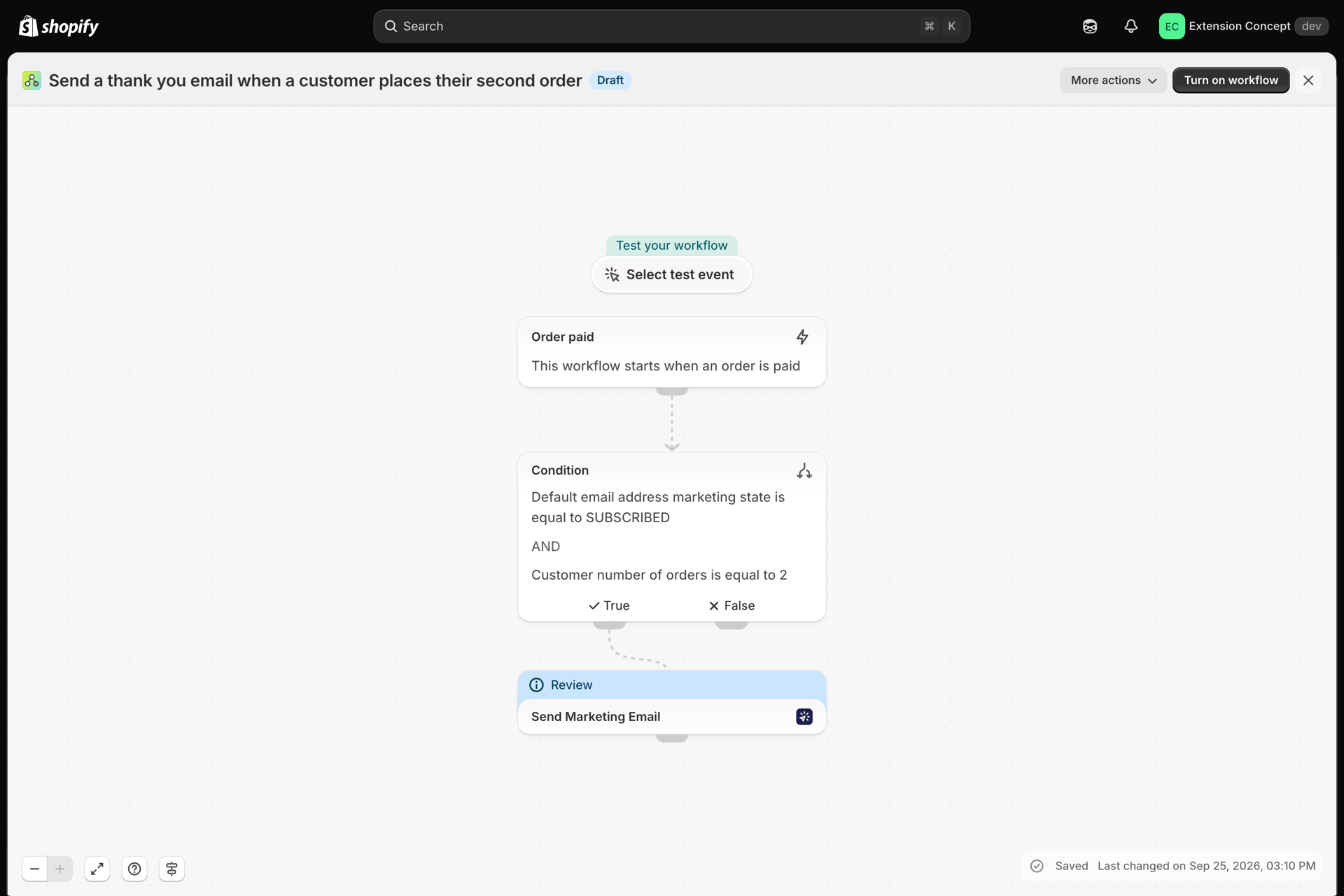
One trigger, a condition and one Send Marketing Email step. The recipient, the language and the variables are already filled in from Flow's data; you only choose the sender and the marketing layout.
What it needs
- The app installed, with an email sender connected (Email senders overview) and a marketing email layout for this email (Marketing emails and unsubscribes). A thank you with an offer is marketing email: set the layout's Email type to Marketing, because the step only lists marketing layouts.
- After the import, open the Send Marketing Email step and choose that sender and that layout. The file cannot carry them: they belong to your store.
- Your company details and the unsubscribe sentence under Settings, tab Marketing emails. The app appends them to every marketing email (Settings).
- Nothing else: Order paid is a built-in Shopify trigger. The workflow only emails customers subscribed to email marketing, and customers who unsubscribed through the link in an earlier email are skipped automatically.
Get the workflow
- Download the
.flowfile attached at the bottom of this page. - In your Shopify admin open Flow, click Import and choose the file.
- Open the Send Marketing Email step, choose the sender and the marketing layout, and save.
- Click Turn on workflow.
The file is an export from Shopify Flow itself. Do not edit it by hand; change the workflow in Flow after importing it.
How it works
- Order paid starts the workflow when an order is paid in full.
- Condition checks two things, and both must be true:
order.customer.defaultEmailAddress.marketingStateEqual toSUBSCRIBED, andorder.customer.numberOfOrdersEqual to2. A first order, a third order or a customer without marketing consent stops here. - Send Marketing Email sends the layout you choose to
{{ order.customer.email }}, in the customer's language ({{ order.customer.locale }}), with these variables:customer_name,order_name,shop_nameandshop_url. The email carries its own unsubscribe link and your company details in the footer. If the customer unsubscribed through an earlier email, nothing is sent and History shows the event as Skipped.
Build the layout
Greet the customer with Hello {{ variables.customer_name }}, thank them for order {{ variables.order_name }} and link {{ variables.shop_url }} from a button, with a discount code for the next order if you offer one. Set the layout's Email type to Marketing; the unsubscribe link and your company details are added below the layout automatically. Every variable the step sends is read in the layout as {{ variables.name }}; the Use in Shopify Flow card on the layout page lists the ones your layout uses. See Passing data from Shopify Flow.
Make it yours
- Change the
2in the condition to5or10for a loyalty thank you after more orders. - Add a Wait step of a few days before the condition so the email arrives after the parcel, not with the payment receipt.
- Add a condition on
order.customer.amountSpentGreater than an amount to thank only your best customers.
Next steps
- Workflow templates - all templates.
- Marketing emails and unsubscribes - marketing layouts, the unsubscribe footer and the Unsubscribes page.
- Send emails in your customer's language - a translation per customer language, picked by the Language field.
- History and troubleshooting - check that the email went out.